
This help page is for Desktop Studio. This information is also available for Studio.
|
|
Allows you to add comments or other text that's visible on the script canvas. Annotation and the
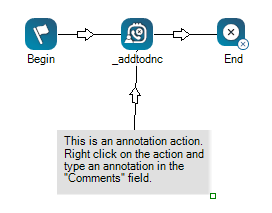
When you click and drag Annotation onto your canvas, you will notice that, unlike other actions, the icon turns into a gray space. You can resize the annotation area by clicking the bottom-right corner of the action and dragging it in or out to your desired size. You can enter your annotation in the action's Properties, either directly into the property field or clicking the ellipsis to open the string editor. |

Supported Script Types
|
|
|
|
|
|
|
|
|
|
Generic |
Chat | Phone | Voicemail | Work Item | SMS |
|


Script Example
The following image shows an expanded size of the annotation area, custom text within the area, and the connector that connects to an action. Typically a connector is used to show a relation between the comment and the connected action.