

When you handle an interaction The full conversation with an agent through a channel. For example, an interaction can be a voice call, email, chat, or social media conversation. in Unified Agent Workspace for ServiceNow, an Interaction record appears. It provides information about the interaction, including its ID number, assignee, and current state. It also provides information about the contact The person interacting with an agent, IVR, or bot in your contact center., such as their recent cases and past interactions. Three tabs appear:
-
Details: Shows general information about the interaction.
-
Customer Information: Displays information about the contact and their ServiceNow cases.
-
Customer History: Lists past interactions with the contact.
-
Related Tasks:
You can edit some fields in Interaction records. To save your changes, click More Actions  > Save.
Details Tab
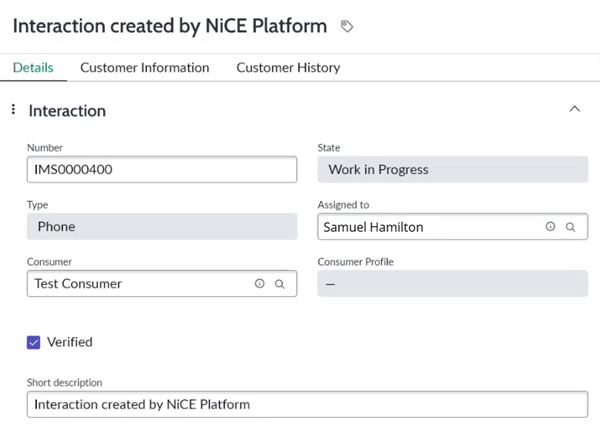
| Field | Details |
|---|---|
| Number | The unique ID number for the interaction The full conversation with an agent through a channel. For example, an interaction can be a voice call, email, chat, or social media conversation.. |
| State | The status of the interaction, such as Work in Progress or Closed Complete. |
| Type | The channel Various voice and digital communication mediums that facilitate customer interactions in a contact center. of the interaction, such as Phone or Email. |
| Assigned to | The agent assigned the interaction. |
| Account | The Account record for the contact The person interacting with an agent, IVR, or bot in your contact center. associated with the interaction. To change it, click the magnifying glass  and select an Account from the list. This field may not appear. and select an Account from the list. This field may not appear. |
| Contact | The Contact record for the contact The person interacting with an agent, IVR, or bot in your contact center. associated with the interaction. To change it, click the magnifying glass and select a Contact from the list. This field may not appear. |
| Consumer |
The Consumer record for the contact |
| Consumer Profile | A link to more information about the contact, contained in their Consumer record. |
| Verified | A checkbox that indicates if the contact is verified. |
| Short Description | The title of the interaction. |
Customer Information Tab
This tab only displays data if a Consumer record is linked on the Details tab.
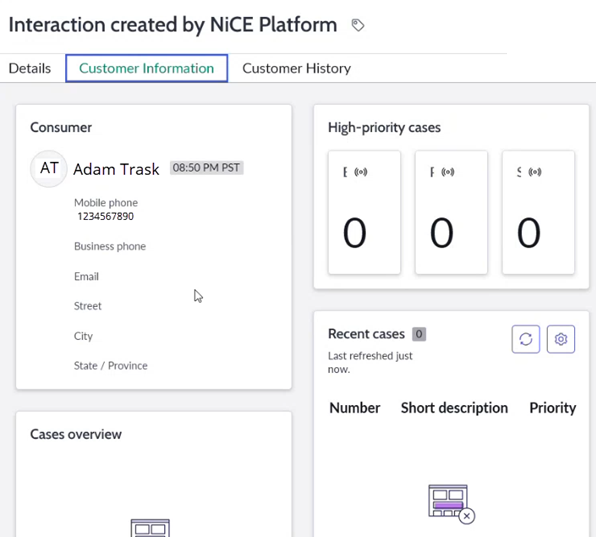
| Field | Details |
|---|---|
| Consumer |
Displays the basic information about the contact |
| High-priority cases | Shows the number of escalated, P1, and SLA breached cases for the contact. |
| Cases overview | Displays basic information about cases for the contact, such as states and scheduling. |
| Recent cases | Shows the ID number, short description, and priority level of the contact's most recent cases. |
Customer History Tab
This tab only displays data if a Consumer record is linked on the Details tab.
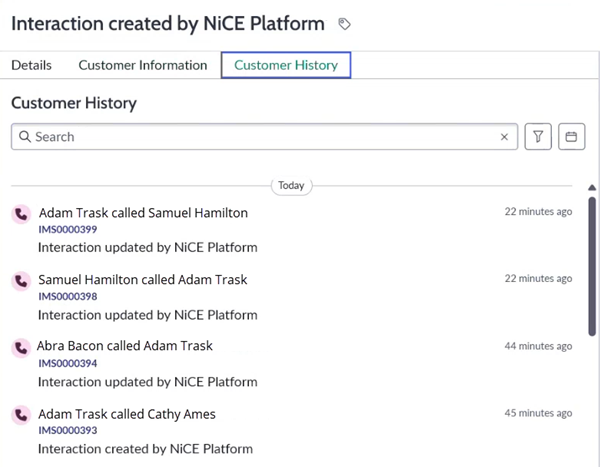
The Customer History tab displays a list of past interactions with the contact The person interacting with an agent, IVR, or bot in your contact center.. For each interaction The full conversation with an agent through a channel. For example, an interaction can be a voice call, email, chat, or social media conversation., it shows the channel Various voice and digital communication mediums that facilitate customer interactions in a contact center., the agent, the Interaction record number, and how long ago it happened.