

Advanced Rules (Rules Engine) can detect what is said in an interaction in three ways. A keyword or a phrase looks for what was said. An intent looks for what was meant. Choosing the right one decides how often a rule triggers correctly. This page explains how each works, where they differ, and when to use which.
This page covers two of the trigger types in Advanced Rules (Rules Engine): Keywords and Phrases, and Intent Based Conditions. A single rule uses one trigger. Keywords and phrases are entered together but matched differently, so this page describes three match types: keyword, phrase, and intent. For Interaction Events and Sentiment Based Conditions, see Advanced Rules (Rules Engine).
| Match type | What you enter | What it detects | Best for | Watch out for |
|---|---|---|---|---|
| Keywords | A single word, such as "refund" | That exact word in the interaction | Names, product terms, codes | Triggers on every mention, even unrelated ones |
| Phrase | A short expression, such as "cancel my account" | That expression, exactly or with small differences in form | Scripted lines, disclosures, known wordings | Does not read context, negation, or who the sentence is about |
| Intent | A sentence describing a goal, such as "Customer asks to cancel an active service" | The meaning of what is said, read in context | Goals and situations that people say many different ways | Needs clear wording and a confidence setting that you tune |
Keywords and Phrases Share One Field
-
A keyword is a single word with no spaces, such as "refund" or "Acme".
-
A phrase is two or more words with spaces between them, such as "cancel my account".
-
Both go in the same field, Add Keywords or Phrases, on the Rule Logic tab. There is no separate field for each.
-
You can build a keyword and phrase rule in three ways:
-
Only keywords, for example "Acme", "Globex".
-
Only phrases, for example "cancel my account", "close my account".
-
A mix of both, for example "refund", "money back", "charge reversal".
-
A rule can hold up to 20 entries in total. Each entry must be at least 3 characters.
-
The system tells them apart by the space. An entry without a space is matched as a keyword. An entry with a space is matched as a phrase.
 View image
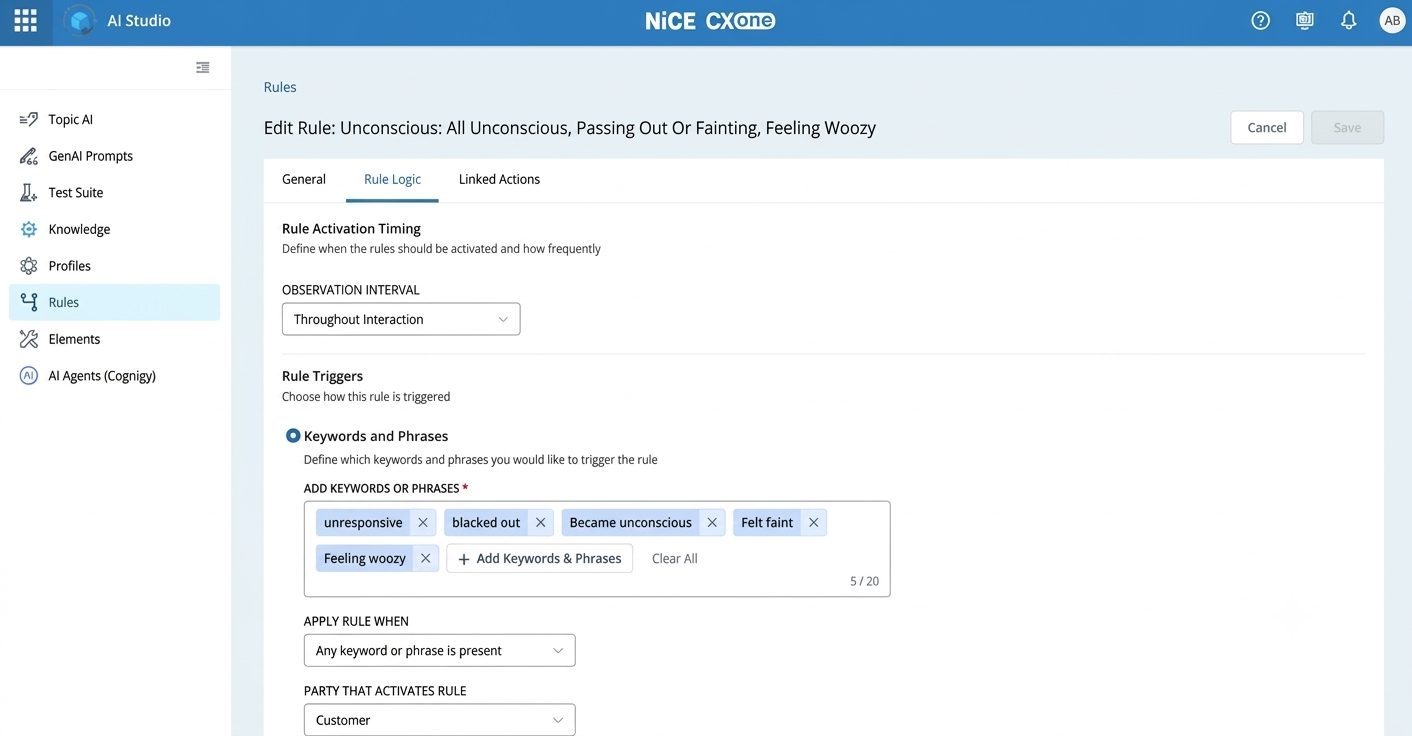
Keywords and phrases in one rule. "unresponsive" is a keyword. "blacked out", "Felt faint" and the others are phrases. All are entered in the same Add Keywords or Phrases field.
How Keyword Matching Works
A keyword rule triggers when a chosen word is said, so it suits distinctive terms that mean only one thing. You add single words to the Add Keywords or Phrases field, choose whose speech counts (Customer, Agent or Either Party), and decide whether any one word or all of them must appear.
Keyword matching looks at the word itself, not at the meaning of the sentence around it.
| Keyword added | Triggers on | Does not trigger on |
|---|---|---|
| refund | "I want a refund for this order." | "I want my money back." (different word, same meaning) |
| Acme | "I am thinking of switching to Acme." | "I am thinking of switching to your competitor." (name not said) |
Use case: competitor mention. A telecom team wants a card with retention offers whenever a customer names a rival brand. They add the keywords "Acme" and "Globex", set the party to Customer, and keep the activation threshold at 1. The brand names are distinctive, so keywords are precise and easy to explain.
Where keywords fall short: A common word triggers wherever it appears: "charge" also matches "who is in charge here?", and "red" can match a street address. If a word has more than one everyday meaning, use a phrase or an intent instead.
A keyword also triggers when the customer denies it or talks about the past. "No rash, just the fever" triggers on "rash", and "I had a concussion years ago" triggers on "concussion". If a denial or a past event would show the wrong card, use an intent instead.
How Phrase Matching Works
A phrase rule triggers when a short expression is said, either exactly as written or with small differences in form, so you do not have to list every spelling or word form. You add multi-word expressions, such as "cancel my account", to the same Add Keywords or Phrases field, choose whose speech counts, and set how many matches are needed.
Phrases are checked in two steps:
-
Exact match: If the phrase's words appear as written, ignoring capital letters, the rule triggers. This also matches inside a longer word. For example, "date of birth" also matches "date of birthday".
-
Fuzzy match: If there is no exact match, an AI model checks whether the same words were said with small differences in form.
How the AI model is used for phrases: Phrase rules use an AI model only for fuzzy matching: recognizing the same words said with small differences, such as typos, word forms, short forms, filler words or extra words in between. The model does not interpret meaning, so a phrase rule does not match synonyms, paraphrases or sentences that say the same thing in different words. To detect meaning, use an intent rule.
Phrase matching still reads the words that were said. It does not understand the situation around them.
| Phrase added: "cancel my account" | Result | Why |
|---|---|---|
| "I want to cancel my account." | Triggers | Same wording |
| "I do not want to cancel my account." | Also triggers | The rule cannot read "not" |
| "My sister cancelled her account last year." | Also triggers | The rule cannot tell who is cancelling |
| "I am done with you guys, it is not worth the money." | Does not trigger | No wording in common, even though the meaning is the same |
What Fuzzy Matching Covers
Fuzzy matching recognizes the same words said with small differences. It does not match a different way of saying the same thing.
| Variation | Phrase added | Also matched |
|---|---|---|
| Capital letters | date of birth | "Date Of Birth" |
| Filler words and stutters | hit my head | "I hit my, um, my head" |
| Typos and speech-to-text spelling errors | car accident | "car acident" |
| Singular and plural | file a claim | "file two claims" |
| Verb tense and word forms | file a claim | "filed a claim" |
| Irregular word forms | dog bit me | "the dog has bitten me" |
| Short forms and abbreviations | date of birth | "DOB" (usually) |
| Dotted and formatted forms | made in USA | "made in U.S.A." |
| Split, joined or hyphenated words | log in | "login", "log-in" |
| Extra words between the phrase words, in the same order | my water broke | "my water just broke" |
What Fuzzy Matching Does Not Cover
These situations need an intent rule.
| Situation | Phrase added / what the customer says | Result |
|---|---|---|
| Synonyms | "passed away" / "he died" | Does not match |
| Paraphrase | "trouble breathing" / "I can't breathe" | Does not match |
| Idioms | "my water broke" / "I think I'm in labor" | Does not match |
| Negation | "hit my head" / "No, I didn't hit my head" | Still matches |
| Past events | "hit my head" / "I hit my head years ago" | Still matches |
Fuzzy matching applies to phrases only. A keyword matches only the exact word, so "DOB" entered as a keyword does not match "date of birth". For terms that matter most, such as a regulated statement, still add the exact versions you care about to the list so the result is predictable.
Use case: identity verification prompt. A contact center wants a checklist card when the agent starts the verification step. They add the phrases "date of birth" and "verify your identity" and set the party to Agent. The agent's script is known and repeatable, so a phrase rule is a good fit.
Where phrases fall short: Phrases work when the wording is predictable and the meaning does not change with context. When customers say the same thing in many different ways, or when "not" or "someone else" would reverse the meaning, use an intent.
Always test with sentences that should not trigger, such as denials and past events, and remove or reword any phrase that triggers on unrelated interactions.
Activation Threshold for Keywords and Phrases
For keyword and phrase rules, the threshold is the number of matches needed before the rule triggers.
| Setting | Use when | Example |
|---|---|---|
| 1 | One mention is enough: distinctive terms and scripted lines | A competitor name, "date of birth" |
| 2 | People use the expression casually, so one passing mention is not meaningful | "thinking about canceling" |
| 3 or more | You need strong evidence before acting. Rarely needed. | A topic that must come up repeatedly before a card appears |
Keep the setting at or below the number of times customers typically say the expression. A threshold of 2 on something said once per interaction rarely triggers.
How Intent Matching Works
An intent rule triggers when the interaction expresses the goal you describe, even if none of your words are said. You write one sentence, up to 200 characters, that says what the customer is trying to do. The interaction is read as it unfolds, and a confidence setting controls how sure the system must be before the rule triggers. Intent detection uses only the customer's side of the interaction.
A higher confidence setting means fewer triggers and a lower chance of false alarms, but borderline cases may be missed. A lower setting catches more, with a higher chance of false alarms. Each intent rule has its own confidence setting.
| Intent: "Customer asks to cancel an active service" | Result | Why |
|---|---|---|
| "I want to cancel my service." | Triggers | Direct statement of the goal |
| "Honestly this is not worth the money anymore, I am done." | Triggers | Same goal, different words |
| "What is the process to end my contract?" | Triggers | Same goal, phrased as a question |
| "I do not want to cancel, I just want to understand this charge." | Does not trigger | The goal is the opposite |
| "My neighbor cancelled his service last week." | Does not trigger | The speaker is not asking to cancel |
Use case: first notice of loss (insurance). An insurer wants a claim-capture checklist when a customer reports a new loss. The intent is "Customer reports a new accident, damage, or theft not yet filed as a claim". Customers say this in many ways ("I got rear-ended", "a tree came down on my garage"), and many never say the word "claim". Example settings: confidence around 0.6 to start, observation interval of the first 120 seconds, and an occurrence limit of 1. These settings are explained in Settings That Shape Matching. The words "not yet filed" keep the rule from triggering on interactions about an existing claim, which should have their own separate rule.
Where intent needs care: Intent depends on clear wording. A vague sentence such as "Handle billing issue" overlaps with many other rules and triggers unpredictably. The best practices below show how to write intents that stay precise.
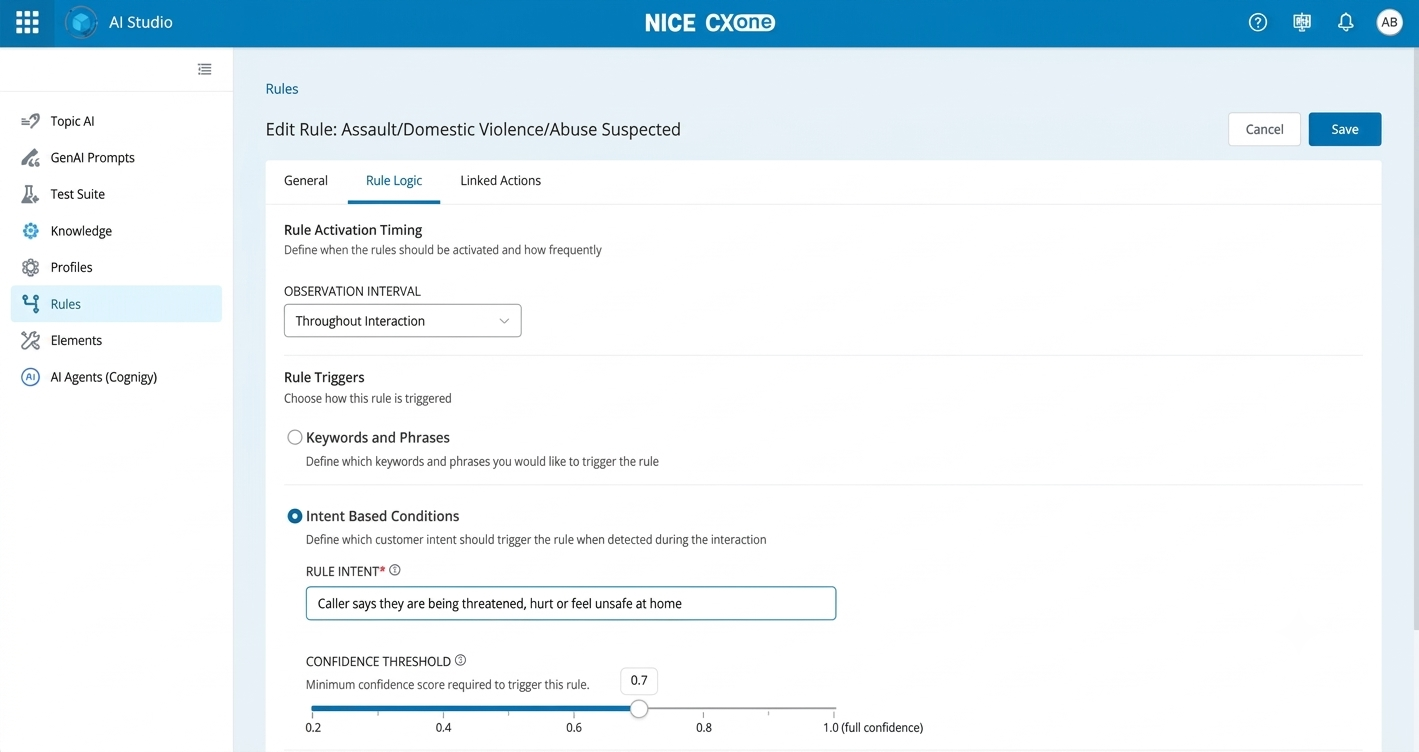
An intent rule. Select Intent Based Conditions, write one sentence describing what the customer is trying to say, and set the confidence threshold (default 0.7).
Write Effective Intents
A good intent names the speaker, describes one goal, and adds a qualifier, using the words your customers use.
Good examples
| Intent | Industry | Why it works |
|---|---|---|
| Customer reports a charge on their account that they did not make or authorize | Banking | One goal. "Did not make or authorize" separates it from disputing a charge they recognize. |
| Customer asks to cancel an active insurance policy, now or at a future date | Insurance | Names the speaker and one action. "Active" rules out lapsed policies and renewal calls. |
| Customer says their internet or phone service is not working at their location | Telecom | Written in the customer's words. "At their location" avoids triggering on general complaints about the provider. |
| Caller asks to schedule a new appointment with a specific provider or specialty | Healthcare | "New" separates it from rescheduling or confirming an existing appointment. |
| Customer explicitly asks to speak with a supervisor, manager or someone more senior | Any | "Explicitly asks" keeps it from triggering on venting or on "my manager said...". |
Bad examples
| Intent | What is wrong | Better version |
|---|---|---|
| Customer is unhappy | An emotion, not a goal. It triggers on venting and unrelated complaints. | Use a sentiment condition, or name the goal: "Customer asks to file a complaint about a billing error" |
| Handle billing issue | Too broad. It overlaps with disputes, payments, refunds and plan changes. | One rule per goal: "Customer asks for more time to pay a bill that is due" |
| Customer wants to cancel, get a refund or change their plan | Three goals in one, so it cannot lead to a single card. | Split it into three separate intents |
| claim_status_v2 | A label, not a sentence. It gives the system nothing to read. | "Customer asks about the status of a claim they already filed" |
| Coverage | No speaker and no goal. It triggers on any mention, including hypotheticals. | "Customer asks whether a specific service is covered under their current plan" |
Before you save an intent, check that it:
-
Starts with the speaker, such as "Customer" or "Caller".
-
Describes one goal and one action.
-
Includes a qualifier that separates it from similar rules.
-
Uses everyday customer language rather than internal terms.
-
Reads as a complete sentence.
Choose a Confidence Threshold
The threshold decides how readily a rule triggers, so set it by what a wrong result costs you. Lower it where missing a case is worse than showing an extra card, and raise it where a wrong card is the bigger problem. The intent confidence threshold ranges from 0.2 to 1.0.
| Setting | How the rule behaves | Use when | Example |
|---|---|---|---|
| Lower (about 0.4 to 0.5) | Triggers readily and catches indirect wording, with more false alarms | A missed case is costly and an extra card does little harm | Fraud or unauthorized charge reports, supervisor requests, formal complaints |
| Balanced (about 0.6) | A good starting point for most rules | You are unsure yet, or both kinds of error are acceptable | Cancellation risk, first notice of loss |
| Higher (about 0.7 to 0.8) | Triggers only on clear statements, with fewer false alarms and some borderline wording missed | A wrong card is disruptive or distracting | Opening a long checklist, upsell offers, low-risk reminders |
| Very high (0.9 and above) | Triggers rarely | Only exact, unambiguous statements should trigger it | Rarely needed. Consider a phrase rule instead. |
How to tune it: Start at the balanced setting and replay your test sentences. If clear cases are missed, lower the threshold by 0.1 and retest. If wrong cases trigger, tighten the wording of the intent first, then raise the threshold by 0.1. The product default is 0.7. We suggest starting at 0.6 to catch more indirect wording.
Phrase and Intent: Key Differences
Phrase matching finds wording, and intent matching finds meaning. The gap shows up in three places: how many ways a customer can say the same thing, whether the sentence is negated or about someone else, and how much context is needed to understand it.
| Phrase | Intent | |
|---|---|---|
| What you provide | Expressions to look for | A sentence describing a goal |
| What it matches | Exact wording, plus fuzzy variations such as typos and word forms | Meaning in context |
| How it decides | Checks for the exact wording first. If not found, an AI model checks only for fuzzy variations and answers yes or no. It does not judge meaning. | An AI model reads the meaning in context and gives a confidence score |
| Sensitivity you can adjust | None. You control only how many matches are needed (activation threshold) | Confidence threshold, 0.2 to 1.0, set per rule |
| Different ways of saying it | Not covered. Only the same words, with small differences in form | Covered, including indirect statements |
| Negation ("I do not want to...") | Not understood | Designed to be understood |
| Who is speaking, and about whom | Not understood. Use the party setting | Understood from the sentence you write |
| Predictability | Medium. Exact wording always triggers, and fuzzy variations also trigger, so check test results. | Lower, based on a confidence score |
| Tuning | Add or remove phrases, change thresholds | Reword the intent, adjust confidence |
| Best for | Known terms and scripted lines | Goals and situations with varied wording |
Side by side: The same statements against a phrase rule ("cancel my account") and an intent rule ("Customer asks to cancel an active service"). Results show typical behavior. Test with your own sentences.
| What was said | Phrase rule | Intent rule |
|---|---|---|
| "I want to cancel my account." | Triggers | Triggers |
| "I am done with you guys. It is not worth the money." | Does not trigger | Triggers |
| "How do I get out of my contract?" | Does not trigger | Triggers |
| "I do not want to cancel my account." | Triggers (unwanted) | Does not trigger |
| "My sister cancelled her account last year." | Triggers (unwanted) | Does not trigger |
The first row works with either type. The other four show where intent is the better fit.
Choose the Right Match Type
Choose by asking what you are trying to detect: a known word, a known wording, or a goal. Start with the narrowest type that does the job, and move to intent only when the wording varies too much or the meaning depends on context.
| If what you want to detect is... | Use |
|---|---|
| A specific name, product, code or term | Keyword |
| A scripted line or known wording, such as a greeting or a disclosure | Phrase |
| A customer goal or situation that people say many different ways | Intent |
| Something where "not", "someone else" or what came earlier changes the meaning | Intent |
| A trigger you must be able to explain exactly, for audit or compliance | Keyword |
| A customer's mood or tone, such as frustration | A sentiment condition rather than keyword, phrase or intent |
One issue, one rule: You can create as many rules as you need, but tracking the same issue with more than one rule is not recommended, for example a keyword and phrase rule and an intent rule for the same issue. Both can trigger in the same interaction, and the agent sees duplicate cards. If a keyword and phrase rule misses the different ways customers say it, consider moving the issue to an intent instead of adding a second rule.
Moving from phrase to intent: If a phrase rule misses interactions that clearly match, or triggers on sentences that only mention the topic, rewrite it as an intent instead of adding more phrases. More phrases rarely fix negation or context.
Best Practices
Keep every rule narrow: one match type, one purpose, one card. Most problems come from rules that are too broad, or from rules that overlap with each other.
Keywords
Do:
-
Use keywords for distinctive terms such as product names, competitor names and codes.
-
Keep the list short and specific.
-
Set the party so that only the right speaker triggers the rule.
Do not:
-
Use common words such as "problem", "charge" or "claim". They trigger on unrelated conversation.
-
Use a keyword to detect a goal, for example "cancel" for cancellation. Use a phrase or an intent.
Phrases
Do:
-
Use full expressions of two or more words, for example "file a claim" rather than "claim".
-
Add three to six different everyday wordings, such as "a dog bit me", "got bitten by a dog" and "dog bite on my arm". Fuzzy matching already covers typos and word forms, so you do not need to add those.
-
Raise the activation threshold to 2 or more for expressions that people say casually.
-
Set the party. A scripted agent line should use Agent, and a customer request should use Customer.
Do not:
-
Add near-duplicate phrases to fill the list. Cover different wordings instead.
-
Repeat the same phrase across several rules. Overlapping rules can show cards that do not fit the interaction.
Intents
-
Follow the checklist in Write Effective Intents.
-
Set the confidence for each rule by its risk. Use a lower setting where a miss costs more than an extra card, and a higher one where noise is the bigger problem.
-
Do not use a diagnosis or technical term if customers do not use it. Callers say "my heart is racing", not "tachycardia".
Settings That Shape Matching
The match type decides what a rule looks for, and the settings decide when and how often it triggers. Set them deliberately, because the same phrase or intent behaves very differently with different settings.
| Setting | Applies to | What it does | Guidance |
|---|---|---|---|
| Party That Activates Rule (Customer, Agent, Either Party) | Keywords and Phrases | Chooses whose words count | Use Customer for customer requests and Agent for scripted lines. Avoid Either Party unless either speaker should trigger it. For intent, name the speaker in the sentence. |
| Apply Rule When | Keywords and Phrases | Chooses whether the rule triggers when the listed items are said (any one, or all of them) or when they are not said (any one, or all of them missing) | Use "Any keyword or phrase is present" in most cases. "All keywords and phrases are present" rarely triggers if the items seldom appear together. Use a "missing" option to catch something that should have been said, for example an agent not reading the recording disclosure. |
| Activation Threshold | Keywords and Phrases | Number of matches needed before the rule triggers | Use 1 for distinctive terms and 2 or more for casual expressions. |
| Confidence Threshold (0.2 to 1.0) | Intent | How sure the system must be before the rule triggers | Set per rule. Start around 0.6 (product default 0.7). See Choose a Confidence Threshold. |
| Observation Interval | Keywords and Phrases, Intent | Throughout the interaction, within the first N seconds, after N seconds, or between two times | Use Within the First for topics stated at the start of an interaction. This stops later passing mentions from triggering the rule. |
| Occurrence Limit | Keywords and Phrases, Intent, Sentiment | Maximum times the rule can trigger in one interaction | Use 1 for one-time actions such as a capture checklist. |
| Cool Off Period | Keywords and Phrases, Intent, Sentiment | Minimum seconds between two triggers. Shown only when Occurrence Limit is more than 1. Default is 60 seconds. | Use it to stop the same card from reappearing repeatedly. |
| Max rules per interaction (profile setting) | All rules in the profile | Limits how many rules can trigger in one interaction. Off by default, which means no limit. | Turn it on if agents see too many cards in one interaction. Start with a small number and raise it if important cards stop appearing. |
| Rule priority (profile setting) | All rules in the profile | Applies only when more rules match than the Max rules per interaction limit allows. Priority is set by the order of rules in the profile's Rules tab, with the top rule highest. For example, if a transcript matches three rules and the limit is two, the two highest-priority rules trigger and the third is skipped. | Drag the most important rules, such as safety or compliance cards, to the top. |
| Rules per profile | All rules in the profile | A profile can have up to 100 rules assigned. | Assign only the rules agents need on this profile. If you reach the limit, remove inactive or overlapping rules first. |
Worked Use Cases
These examples show which match type fits a goal and how the rule might be set up. Treat the settings as starting points and test them on your own interactions.
| use case | Match type | Example configuration | Why this type |
|---|---|---|---|
| Recording disclosure (compliance) | Phrase | Phrases "this call may be recorded", "calls are recorded for quality". Party: Agent. | The agent's wording is scripted and repeats on every call. |
| Competitor mention (retention) | Keyword | Keywords "Acme", "Globex". Party: Customer. Threshold: 1. | Brand names are distinctive, so they are precise and cannot be confused with other words. |
| Cancellation risk (retention) | Intent | "Customer asks to cancel an active service". Confidence: start near 0.6. | Customers rarely say "cancel". They say "I am done" or "how do I end my contract". |
| Supervisor request | Intent | "Customer explicitly asks to speak with a supervisor, manager or someone more senior". | Customers say "someone who can actually fix this" without the word supervisor. |
| Symptom guidance (healthcare) | Intent | One intent per card, with severity built in, such as "Caller describes a persistent fever lasting more than three days with no other severe symptoms". | The same symptom leads to different cards depending on severity, and callers describe symptoms in their own words. |
| Billing dispute | Intent | "Customer says a charge on their bill is wrong or unrecognized". Confidence: start near 0.6. | Customers describe a disputed charge in many different ways and rarely use a fixed term. |
Healthcare note: For rules that guide patient calls, give each emergency situation its own dedicated rule rather than bundling it with general symptoms, and have a clinician review the wording before go-live.
Test and Tune Rules
Test every rule for both cases: it triggers when it should, and it stays quiet when it should not. Most teams test only the first.
-
Write 8 to 10 test sentences per rule. Include about five that should trigger and five near-misses that should not, such as a negation, a mention of another person, or a related but different request.
-
Replay them, then check the rule against real interaction transcripts before go-live.
-
For a phrase rule, add everyday wordings that were missed, and remove generic words that triggered on unrelated interactions.
-
For an intent rule that misses a clear case, lower the confidence in small steps and retest. If it triggers on wrong cases, tighten the wording first, then raise the confidence.
-
Check for overlap. If two rules share phrases, or two intents describe nearly the same goal, merge or re-scope them so that one interaction does not show several unrelated cards.
-
Review results after go-live and tune one rule at a time, so you can see which change made the difference.
Example test set for "Customer reports a new accident, damage or theft not yet filed as a claim"
| What was said | Expected |
|---|---|
| "I was in a car accident this morning." | Trigger |
| "Hail damaged my roof, what do I do?" | Trigger |
| "I am calling to check on the claim for my accident." | Do not trigger |
| "Does my policy cover theft?" | Do not trigger |
| "I had an accident, already filed online, I need a rental." | Do not trigger |
For basic test steps, see Test a Rule.
Troubleshooting
Most issues come from a threshold, overlapping rules, or the wrong match type for the goal. Use this table to find the likely cause.
| Problem | Possible cause | Solution |
|---|---|---|
| A phrase rule triggers in some interactions and not others | The activation threshold is higher than the number of matches in the interaction, or the wording varies | Lower the threshold to 1, add everyday wordings, or move to an intent |
| A card appears in unrelated interactions | A generic word or phrase, or an intent that is too broad | Use specific multi-word phrases, add a qualifier to the intent, or raise its confidence |
| The expected card does not appear | The rule is inactive or not assigned, another rule took priority, a limit on cards per interaction was reached, or the card already showed earlier in the interaction | Check that the rule is active and assigned, look for overlapping rules, and review the occurrence limit and cool off period |
| Several cards appear at once | Overlapping rules that share phrases or describe similar goals | Remove shared phrases and separate intents with clear qualifiers |
| A phrase rule triggers on "I do not want to..." | Phrase matching cannot read negation | Rewrite the rule as an intent |
| An intent does not trigger on a clear statement | The confidence is set too high, or the wording is too narrow | Lower the confidence in small steps, and widen the wording slightly while keeping a single goal |
| An intent triggers on a related but different request | The wording lacks a qualifier | Add words that separate it, such as "new", "active" or "not yet filed", and build the related case as its own rule |
Quick Summary
Use the simplest match type that fits the goal, and move to intent when wording or context makes phrases unreliable.
-
A known word or name: use a keyword.
-
A known wording or scripted line: use a phrase.
-
A goal that people say in many ways, or where "not" or "someone else" changes the meaning: use an intent.
-
Always set the party, keep each rule to one purpose, and avoid sharing phrases between rules.
-
Test with sentences that should trigger and sentences that should not, then tune one rule at a time.