


|
Passes metadata fields that have been populated with values to the Discover platform as they pertain to the active contact. In other words, the value or information can be passed to the Discover system and tied to the contact. This action applies only to those who have the optional Uptivity Survey product. |
Supported Script Types
|
|
|
|
|
|
|
|
|
|
Generic |
Chat | Phone | Voicemail | Work Item | SMS |
|


Input Properties
These properties define data that the action uses when executing.
|
Property |
Description |
|---|---|
| CustomFilter |
Maps to the ACD (automatic call distribution) System that recognizes, routes, and connects contacts to available agents based on skill and priority. Gate field in Discover. System that recognizes, routes, and connects contacts to available agents based on skill and priority. Gate field in Discover.
|
| User1-8 | Maps to the User 1 through User 8 fields in Discover. |
Result Branch Conditions
Result branch conditions allow you to create branches in your script to handle different outcomes when an action executes.
|
Condition |
Description |
|---|---|
| Default | Path taken unless the script meets a condition that requires it to take one of the other branches. It is also taken if the action's other branches are not defined. |
Tips & Tricks
- Twenty characters per field are allowed as a maximum. Any values over twenty characters will be truncated.
- DiscoverMetaData is populated with metadata until the Onrelease event occurs, specifically when the agent is disconnected from the call.
- Consider a scenario in which the system asks the contact to select the product they are interested in. When the customer makes the selection, DiscoverMetaData transfers that data to Discover. The customer may make a product selection, but when he speaks to the agent, he realizes that he has selected the wrong product, and the agent selects a different product on the contact's behalf. With this collected data, you can create surveys for quality management purposes.
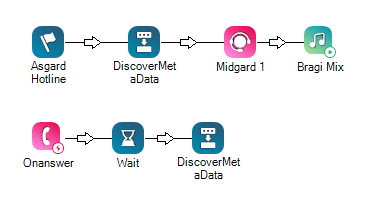
Phone Script Example Using DiscoverMetaData
In the sample script below, the CustomFilter property is mapped to the cfold field in Discover, and the user1 through user8 properties are similarly mapped to the u1old to u8old fields. The data that is being passed will continue being passed until the call ends. For example,
Would you like to download this script?