

Cisco UCCE (On-Premise) with CXone WFM
Introduction
This guide supports customers integrating on-premise Cisco UCCE with CXone WFM using the WFM Engagement Hub. It provides implementation guidance for voice and chat channel integrations, targeting IT administrators, system integrators, and WFM planners.
Scope
-
Covers historical, real-time, and intraday data exchange
-
Applicable to voice channel integration
-
Designed for Cisco UCCE version 15.0(1)
-
Separate queues for inbound and outbound historical data
Not in Scope
-
Outbound and digital channel events.
-
Inbound and outbound in the same queue. If the data (both inbound and outbound) is sent in the same queue eg. voice call back data then this complete record will be ignored and not be considered for calculation of forecasting
-
Manual reload of historical data.
Customer responsibilities
-
Customer is responsible to download and install connector with assistance from the implementation team. Downloads page :- https://downloads.incontact.com/ (You must be logged into the CXone WFM application to access the Downloads page. If not logged in, no files will be available for download.)
-
Customer is responsible for setting up the Cisco UCCE channels and routing.
-
Customer must have an active subscription to Cisco UCCE and respective licenses for the channels and for CXone WFM.
-
For Real-time, the customer has to acquire the Cisco Real time adaptor from Cisco advance services team.
-
For Historical, the customer has to acquire the Cisco Historical adaptor from Cisco advance services team.
-
Assign technical point-of-contact for implementation
Integration Overview
Prerequisites
-
For Real-time, the customer has to acquire the Cisco Real time adaptor from Cisco advance services team. Host and TCP to be informed to NiCE.
-
For Historical, the customer has to acquire the Cisco Historical adaptor from Cisco advance services team. Username, password and folder path) will be given to the customer by NiCE.
-
Mapping of Agent IDs and Skill IDs in WFM as per customer requirement.
-
Access to Testing environment (if applicable).
Architecture
-
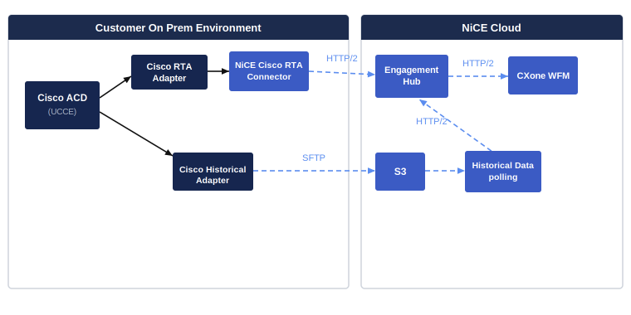
Cisco UCCE (on-prem) → Connector → ACD Hub → CXone WFM
-
The WFM Engagement Hub -Cisco UCCE Connector provides Historic & RTA functionality for Engagement Hub Integration. The connectors are hosted on the customer on-premise
-
The Engagement Hub setup is on the NiCE owned AWS account.
-
The Cisco UCCE Connector setup is hosted on the customer on-premise.
Supported Media Types
-
Inbound Voice
Media channel classifications
-
Immediate response (via inbound voice)
Protocols
-
For Real-time, TCP protocol is used.
-
For Historical, SFTP protocol is used.
Data Types Supported
-
Historical Data (15min)
-
Forecast data
-
Intraday
-
Adherence BI report
-
-
Real-Time Adherence (Agent State Transitions) via Connector
Data Retrieval Specifics
-
Cisco UCCE connector will support below data retrieval mechanisms
-
Real Time: Cisco UCCE connector will listen to TCP Cisco UCCE system for real time agent state events.
-
Historical: Cisco UCCE connector will use SFTP UCCE system to fetch historical data periodically.
Deployment Models
On-prem ACD with on prem connector, with cloud-based WFM.
Contact Data Pegging
-
Contacts Pegging - interval when contact completes.
-
Contact Time Values - interval when contact completes.
All the values for Engagement Hub integration contacts are pegged at the end in the interval when the contact completes.
Example: If a contact begins in one 15-minute interval (12:00 to 12:15) and completes in another interval (12:15 to 12:30), the contact is pegged in the interval when the contact completes (12:15 to 12:30).
Historical Integration
Historical: Cisco UCCE connector will establish JDBC connection with Cisco UCCE system to fetch historical data periodically.
Report data is available in 15-minute intervals. Here are the supported data sets:
Data Mapping & Definitions
Queue Data
|
CXWFM field name |
ucce acd field name |
fcomment |
|---|---|---|
| queueName | ContactQ | Mandatory Contact Queue Identifier - Unique Skill Group identifier |
| contactsReceived | Recv | Mandatory Number of contacts received during the interval for this Skill Group |
| ibContactsHandled | Ans + AnsGOS |
Mandatory Number of answered contacts during the interval for this Skill Group. In Cisco UCCE, a call is pegged as Answered in the period in which it arrives. However, it is not counted as Handled until the call ends and then it pegs in the period in which it ends. AnsGos- Number of calls answered with service level Thresholds |
| obContactsHandled |
Out (Received from agent contact queue report) |
Mandatory The number of outbound contacts made by this Agent and completed during this interval. |
| ibHandledSL | Array of String of service level Ex. ["10/30","20/50","30/100"] Each value is of the format: (Percentage of acdcallsX seconds/ X seconds) X is the threshold | Optional This field defines the service level of handle contacts |
| ibAbandonedSL | Array of String of service level Ex. ["10/30","20/50","30/100"] Each value is of the format: (Percentage of abncallsX seconds/ X seconds) X is the threshold | Optional This field defines the service level of abandoned contacts |
| ibHandledShort | AnsGOS | Optional The number of contacts handled (serviced) before a particular grade of service time was met. The actual grade of service time threshold is determined by the Contact Router system This field only counts inbound type of contacts |
| ibHandledLong | Ans | Optional Number of calls of this call type associated with this skill group that was answered by agents in the interval. In Cisco UCCE, a call is pegged as Answered in the period in which is arrives. It is pegged as Handled in the period in which it ends. |
| ibAbandonedShort | AbaGOS | Optional Number of calls abandoned within Call Type Service Level Thresholds |
| ibAbandonedLong | Aband | Optional Number of abandoned contacts during the interval for this Skill Group. |
| ibAbandoned | Aband + AbaGOS | Optional Number of abandoned contacts during the interval for this Skill Group. + Number of calls abandoned within Call Type Service Level Thresholds |
| ibTalkTime | TalkTime | Mandatory Talk time during the interval for this Skill Group. |
| ibHoldTime | HoldTime | Optional Hold time during the interval for this Skill Group. |
| ibAcwTime | WorkTime | Optional Number of seconds agents associated with this skill group spend in work time during the interval for calls ending in this interval. |
| obTalkTime |
OutTime (Received from agent contact queue report) |
Mandatory The total handle time of Outbound Contacts made by this Agent and completed during this interval. |
| averageSpeedOfAnswer |
Delay /(Ans+AnsGOS) |
Mandatory The average time that contacts waited in the queue before being answered by an agent. Queue delay time divided by summation of answered and answered within service level threshold |
| backlog |
BLog |
Optional This is the total number of contacts received in previous intervals for the Contact Queue that have not been worked / completed / handled / abandoned. |
| backlogNotExpired |
BNotExp |
Optional This is the total number of contacts received in previous intervals for the Contact Queue that have not been worked/completed/handled/abandoned and have not yet “aged” past a specified time limit. The service threshold has not passed for these contacts. These contacts may still be worked in future periods, and the service level objective may still be achieved. |
| backlogExpired |
BExp |
Optional This is the total number of contacts received in previous intervals for the Contact Queue that have not been worked/completed/handled/abandoned before he designated acceptable time limit. The service threshold has passed for these contacts. These contacts may still be worked in future periods, but the service level objective will not be achieved |
Agent Queue Data
|
CXWFM field name |
ucce acd field name |
fcomment |
|---|---|---|
| queueName | ContactQ | Mandatory |
| agentValue | AgentID | Mandatory |
| ibContactsHandled | Ans | Number of calls answered by this agent for this Skill Group or Precision Queue during the interval. |
| obContactsHandled | Out | The number of outbound contacts made by this Agent and completed during this interval. |
| ibTalkTime | TalkTime | refer queue report for definitions Mandatory if ibContactsHandled is present |
| ibHoldTime | HoldTime | Optional Number of seconds this agent in this skill group or precision queue are on hold during the interval. |
| ibAcwTime | WorkTime | Optional The total handle time of Outbound Contacts made by this Agent and completed during this interval. |
| obTalkTime | OutTime | Mandatory if obContactsHandled is present The total handle time of Outbound Contacts made by this Agent and completed during this interval. |
Agent System Data
|
CXWFM field name |
cisco ucce acd field name |
fcomment |
|---|---|---|
| agentValue |
AgentID |
Mandatory |
| agentId |
Field not available with ACD |
Optional |
| inContactsHandled | Int | Optional |
| inContactsHandledTime | IntTime | Optional |
| readyTime | ReadyTime | Mandatory |
| notReadyTime | NotReadyTime | Mandatory |
| obContactsHandled | Out | Optional |
| obContactsHandledTime | OutTime | Optional |
|
logintime |
LoginTime |
Optional |
Agent Activity Report
|
CXWFM field name |
cisco ucce acd field name |
comment |
|---|---|---|
| agentId | LOGID | The login ID that the agent used to log in. Agents in multiple splits/skills have one LOGID. This is a row identifier item. |
| state | split workMode+"" | The work mode in which the agent was working during the trace. Agent work modes include: AVAIL, ACD, ACW, AUX, DACD, DACW, RING, UNKNOWN, OTHER, and UNSTAFF. If the agent was not logged in during the collection interval, the value is blank. |
| startDateTime | event_time STARTTIME_UTC | The UTC start time of the interval for which data was collected. It is records in number of seconds since midnight 01/01/1970 UTC. It applies only to the interval table. This is a row identifier item. |
| duration | duration | The length of time of the current WORKMODE and DIRECTION for this SPLIT. For example, the length of time in current AGSTATE for this SPLIT, in which case, if the agent goes from AUX to AUXOUT and back to AUX, DURATION restarts with each change in work mode. |
| reason | If WORKMODE value is 110 then reason should be LOGOUTREASON considered otherwise AUXREASON should be considered | NA |
| workingState | AUXREASON | The reason code that is associated with the agent's current state. AUXREASON is blank if the agent is not in the AUX state. On communication servers that do not have EAS and reason codes active, AUXREASON is zero. |
Real Time Integration
The Real-Time Adherence (RTA) interface provides agent data, specifically their current states, from Cisco UCCE to NICE WFM.
Data Mapping
REAL TIME AGENT STATES DATA :
|
field |
description |
comment |
|---|---|---|
| loginId | LOGID | Mandatory |
| acdId | ACD_ID_INDEX | Mandatory |
| eventCode | workMode+"" | Mandatory |
| eventUtcTime | TIME_IN_STATE_INDEX | Mandatory |
| reasonCode | REASON_CODE_INDEX | Optional |
Data Constraints
•    NICE WFM Agent Logon ID = Agent ID
•    Logon ID max length = Unlimited - system generated ARN (maximum 256 characters)
•    NICE WFM Agent State = Agent's current state
•    Agent State max length = 100 characters
Observations & Limitations
Observations
Sample(to be verified or added after customer onboarding).
-
Handle Time and Talk Time are calculated at the end of the interaction interval.
-
AUX/ACW states depend on accurate agent state transitions.
-
Queue mapping can affect accuracy of service level metrics.
Known Limitations:
-
Automated and manual Replay and Reload mechanisms are not supported.
-
Metrics can be skewed if agent logins/logouts do not occur within same interval.
-
CMS-generated fields may differ in interpretation depending on report structure.
Monitoring & Troubleshooting
Monitoring:
-
Log files on Connector.
-
Data delivery confirmation.
Troubleshooting Tips:
-
Check agent/queue mismatches.
FAQs
Q: What if agent IDs change?
Ans: Ensure consistent ID mapping in WFM to avoid adherence mismatches.
Q: What are the technical requirements for integration?
Ans: Over 350 MB disk space for installation and at least 1GB for execution
Q: How is data security handled during integration?
Ans: As per each customer's requirement because customer configures their internal network as per their security requirements.
Q: Can multiple Cisco UCCE instances be integrated into a single NICE WFM environment?
Ans: Currently only 1 ACD mapping is been supported.
Q: What happens if the integration fails or data is delayed?
Ans: Reach out to the support team.
Q: Is there any downtime required during setup?
Ans: For new customer, downtime is as per the initial CXone WFM setup process.
Support & Resources
-
NICE Professional Services Contact.
-
CXone WFM Help Center.