

Introduction and Positioning
The Third-Party ACD Integration SDK is a developer toolkit for building integrations that feed workforce data into CXone WFM. You embed it inside a connector for your ACD, and it sends the data CXone WFM needs to run intraday reporting, forecasting and adherence.
Use this SDK when your ACD is not one of the natively supported platforms and you want its real-time and historical data represented in CXone WFM without building a bespoke connector protocol for each system.
What the SDK is
-
A Java toolkit that acts as a REST client to the CXone WFM ASC Manager service. It is distributed as a .jar named asc-manager-3rd-party-sdk and consumed as a dependency inside your ACD connector.
-
Built in pure Java so it works regardless of the Java framework your connector uses.
What it does within CXone WFM
-
Sends agent state events, queue and skill metrics, and agent activity data into CXone WFM.
-
Handles authentication, token refresh, a periodic heartbeat, and ACD-type lookup on your behalf.
Key constraints
-
Developer-facing : Intended for developers. Integration is code-level, built into your connector.
-
One-way: The SDK sends data into CXone WFM. It does not read or pull any data back from your ACD.
-
Server-side validation: Payload validation happens in the ASC Manager service, not in the SDK. Invalid payloads are rejected with an error response.
End-to-End Flow
The diagram below shows the path from authentication through to data landing in CXone WFM. Your connector authenticates once, receives a Bearer access token, then makes authenticated API calls that the ASC Manager service validates and ingests.
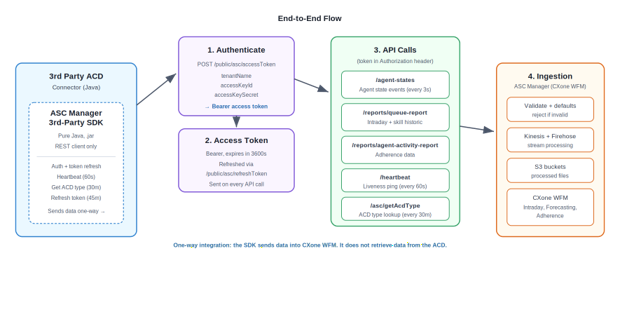
The four stages are: authenticate with your credentials; obtain and hold an access token; make authenticated API calls per data type; and let ASC Manager validate and ingest the data into CXone WFM through Kinesis, Firehose and S3.
Authentication and Getting Started
Authentication uses a set of credentials tied to your tenant. You supply three values to the SDK, and it manages the token exchange for you.
Credentials you provide
|
Value |
Purpose |
|---|---|
| accessKey | Purpose Access key used in the authentication request to obtain a token. |
| secretKey | Secret key used together with the access key. |
| service_url | The ASC Manager service endpoint your connector sends data to. |
The authentication request also carries your tenantName. You obtain the tenant name, access key and secret from your CXone provisioning. Where a value is not yet known in your environment, mark it To be confirmed and confirm it against the Developer API documentation before going live.
For the full authentication contract, see the CXone Developer API documentation (confirm the exact URL for your region).
Getting started: the authentication flow
-
Initialize a security context in your connector with the access key and secret.
-
Build a WFM connection configuration with the service URL and credentials.
-
Open the connection. The SDK calls /public/asc/accessToken and receives a Bearer token that expires in 3600 seconds (1 hour).
-
The SDK attaches the token to every API call, refreshes it every 45 minutes via /public/asc/refreshToken, sends a heartbeat every 60 seconds, and fetches the ACD type every 30 minutes.
Connection setup
Run the following in your connector during initialization:
WFMConnectionConfig wfmConnectionConfig = WFMConnectionConfigBuilder()
                .setURL(serviceUrl)
                .set(accessKey)
                .set(secretKey)
                .build();

                WFMConnection wfmConnection = WFMConnection.getConnection(wfmConnectionConfig);
                wfmConnection.connect();
Access token response
A successful token request returns HTTP 200 with a Bearer token:
{
                "id_token": "",
                "token_type": "Bearer",
                "expires_in": 3600,
                "refresh_token": "",
                "access_token": ""
                }
API Endpoints
Your connector, through the SDK, calls the endpoints below. The SDK sends every payload; ASC Manager validates each one and assigns default values to any missing non-mandatory field.
|
endpoint |
purpose |
Cadence |
success |
|---|---|---|---|
| /agent-states | Receives agent state events. | Every 3 seconds | 202 Accepted |
| /reports/queue-report | Receives intraday and skill historical queue data. | Per interval | 202 Accepted |
| /reports/agent-activity-report | Receives agent activity (adherence) data. | Per interval | 202 Accepted |
| /public/asc/accessToken | Issues a Bearer access token from your credentials. | On connect | 200 OK |
| /public/asc/refreshToken | Refreshes an expired access token. | Every 45 min (SDK) | 200 OK |
| /heartbeat | Liveness signal, no request body. | Every 60 seconds | 200 OK |
|
/asc/getAcdType |
Returns the tenant ACD type used in payloads. |
Every 30 min (SDK) |
200 OK |
For queue-report and agent-activity-report, send a payload for every interval even when there are no interactions. In that case, send an empty report for the interval rather than skipping it.
Field Reference
These tables describe each field in the request payloads: what it means, its format and units, whether it is mandatory, and an example value. Where the source design does not state a value definitively, it is marked To be confirmed.
Time fields follow the UTC format yyyy-MM-dd'T'HH:mm:ss.SSS'Z'. A payload with a missing or malformed time, a missing acdType, or an endDate earlier than startDate is rejected with an INVALID_REQUEST error.
queue-report
Top-level fields
|
field |
description |
format / units |
mandatory |
example |
|---|---|---|---|---|
| acdType | ACD type of the tenant, in the form Generic_{ACD Name} or Generic_{ACD Name}_{Version}. Must match the value returned by /asc/getAcdType. | String | Yes |
"Generic_acdName" |
| reportVersion | Version of the report payload. | String |
"0" |
|
| startDate | Start of the reporting interval, in UTC. | String, UTC: yyyy-MM-dd'T'HH:mm:ss.SSS'Z' | Yes |
"2024-01-15T16:45:00.000Z" |
| endDate | End of the reporting interval, in UTC. Must not be earlier than startDate. | String, UTC: yyyy-MM-dd'T'HH:mm:ss.SSS'Z' | Yes |
"2024-01-15T17:00:00.000Z" |
| status | Status of the report generation. | String | Yes |
"SUCCESS" |
| statusReason | Reason accompanying the status, when applicable. | String | No |
"" |
|
reportData |
Container holding queueReport, agentQueueReport and agentSystemPerformanceReport arrays. Missing arrays are treated as empty. |
Object |
Yes |
{ ... } |
reportData.queueReport[]
|
field |
description |
format / units |
mandatory |
example |
|---|---|---|---|---|
| queueValue | Identifier of the ACD queue the metrics belong to. | String (ACD queue ID) | Yes | "805544" |
| queueName | Display name of the ACD queue. Mapping between ACD queue and WEM skill is To be confirmed. | String | Yes | "Spanish" |
| isOutbound | Whether the queue is an outbound queue. | Boolean | Yes | false |
| contactsReceived | Number of contacts received in the interval. | Integer (count) | Yes | 1 |
| abandonedShort | Contacts abandoned within the short threshold. | Integer (count) | Yes | 0 |
| abandonedLong | Contacts abandoned after the long threshold. | Integer (count) | Yes | 0 |
|
handledShort |
Contacts handled within the short threshold. |
Integer (count) |
Yes |
1 |
|
handledLong |
Contacts handled after the long threshold. |
Integer (count) |
Yes |
0 |
|
handleTime |
Total handle time for the queue in the interval. |
No |
No |
276 |
|
workTime |
Total after-contact work time. |
Yes |
Yes |
3 |
|
queueDelayTime |
Total time contacts waited in queue. |
Yes |
Yes |
405 |
|
svcLvlPct |
Service level achieved for the queue. |
Decimal (percent) |
Yes |
100.0 |
|
rightPartyHandleTime |
Handle time for right-party contacts. |
No |
No |
0 |
|
rightPartyContacts |
Count of right-party contacts. |
Integer (count) |
No |
0 |
|
wrongPartyHandleTime |
Handle time for wrong-party contacts. |
No |
No |
0 |
|
wrongPartyContacts |
Count of wrong-party contacts. |
Integer (count) |
No |
0 |
|
backlog |
Total backlog items for the queue. |
Integer (count) |
No |
0 |
|
backlogNotExpired |
Backlog items not yet expired. |
Integer (count) |
No |
0 |
|
backlogExpired |
Backlog items that have expired. |
Integer (count) |
No |
0 |
|
holdTime |
Total hold time for the queue. |
No |
No |
0 |
|
active |
Active contacts. Relevant to the TTI paradigm; whether it applies to non-TTI ACDs is To be confirmed. |
Integer (count) |
No |
0 |
reportData.agentQueueReport[]
|
field |
description |
format / units |
mandatory |
example |
|---|---|---|---|---|
| queueValue | Identifier of the ACD queue the metrics belong to. | String (ACD queue ID) | Yes | "805544" |
| queueName | Display name of the ACD queue. Mapping between ACD queue and WEM skill is To be confirmed. | String | Yes | "Spanish" |
| isOutbound | Whether the queue is an outbound queue. | Boolean | No | false |
| agentValue | ACD-side identifier of the agent. | String (ACD agent ID) | Yes | "967382" |
| agentId | CXone agent unique identifier. | String (UUID) | No | "11eceb46-..." |
| handled | Contacts handled by the agent for this queue. | Integer (count) | Yes | 1 |
|
handledTime |
handledTime Handle time for the agent on this queue. | Yes | Yes | 276 |
|
workTime |
After-contact work time for the agent. | No | No | 3 |
|
rightPartyhandleTime |
Right-party handle time for the agent. | No | No | 0 |
|
rightPartyContacts |
Right-party contacts for the agent. | Integer (count) | No | 0 |
|
wrongPartyHandleTime |
Wrong-party handle time for the agent. | No | No | 0 |
|
wrongPartyContacts |
Wrong-party contacts for the agent. | Integer (count) | No | 0 |
|
holdTime |
Hold time for the agent on this queue. | No | No | 0 |
|
active |
Active contacts for the agent (TTI paradigm). | Integer (count) | No | 0 |
reportData.agentSystemPerformanceReport[]
|
field |
description |
format / units |
mandatory |
example |
|---|---|---|---|---|
| agentValue | ACD-side identifier of the agent. | String (ACD agent ID) | Yes | "945987" |
| agentId | CXone agent unique identifier. | String (UUID) | No | "11eceb46-..." |
| readyTime | Time the agent spent in a ready state. | Seconds | Yes | 0 |
|
notReadyTime |
Time the agent spent in a not-ready state. | Seconds | No | 0 |
|
loginTime |
Total time the agent was logged in. | Seconds | No | 900 |
agent-activity-report (adherence)
Top-level fields
|
field |
description |
format / units |
mandatory |
example |
|---|---|---|---|---|
| acdType | ACD type of the tenant. Must match /asc/getAcdType. | String | Yes | "Generic_acdName" |
| reportVersion | Version of the report payload. | String | No | "0" |
| startDate | Start of the reporting interval, in UTC. | String, UTC: yyyy-MM-dd'T'HH:mm:ss.SSS'Z' | Yes | "2024-01-15T16:45:00.000Z" |
|
endDate |
End of the reporting interval, in UTC. | String, UTC: yyyy-MM-dd'T'HH:mm:ss.SSS'Z' | Yes | "2024-01-15T17:00:00.000Z" |
|
reportData |
Array of agent activity records. | Array of objects | Yes | [ ... ] |
reportData[]
|
field |
description |
format / units |
mandatory |
example |
|---|---|---|---|---|
| agentValue | ACD-side identifier of the agent. | String (ACD agent ID) | Yes | "19837005" |
| agentId | CXone agent unique identifier. | String (UUID) | No | "11eb0706-..." |
| userName | Agent login / user name. | String (email) | No | "aa4rszz@mmm.com" |
|
agentActivity |
Array of state changes for the agent in the interval. | Array of objects | Yes | [ ... ] |
reportData[].agentActivity[]
|
field |
description |
format / units |
mandatory |
example |
|---|---|---|---|---|
| state | Agent state or event during the activity. | String | Yes | "CallContact" |
| startTime | Start time of the activity, in UTC. | String, UTC: yyyy-MM-dd'T'HH:mm:ss.SSS' | Yes | "2023-10-01T07:59:09.860Z" |
| duration | Duration of the activity. Value scale (milliseconds vs seconds) is To be confirmed. | Yes | 139090 | |
|
reason |
Reason code accompanying the state, when set. | String | No | "" |
agent-states
agentStateList[]
|
field |
description |
format / units |
mandatory |
example |
|---|---|---|---|---|
| loginId | Agent login identifier. | String (email) | Yes | "aa4rszz@mmm.com" |
| acdId | ACD / tenant identifier for the agent. | String | Yes | "Tenant_Name" |
| eventCode |
Code describing the agent state event. |
String | Yes |
"CallContact" |
| reasonCode | Reason code accompanying the event, when set. | String | No | "" |
| eventUtcTime | Time the event occurred, in UTC. | String, UTC: yyyy-MM-dd'T'HH:mm:ss.SSS'Z' | Yes | "2023-10-01T07:59:09.860Z" |
Common Questions
Q: What format should startDate use?
Ans: UTC, in the form yyyy-MM-dd'T'HH:mm:ss.SSS'Z', for example 2024-01-15T16:45:00.000Z. The same format applies to endDate, startTime and eventUtcTime. A malformed value is rejected with an INVALID_REQUEST error.
Q: What do queueValue and queueName represent?
Ans: queueValue is the ACD-side identifier of the queue and queueName is its display name. How these map to WEM skills in CXone WFM is To be confirmed.
Q: Are both queueValue and queueName required?
Ans: Both appear in every sample payload and are treated as mandatory for a queue record. Confirm the exact mandatory set against the Developer API documentation; items shown as To be confirmed in the tables above have not been stated definitively in the source design.
Q: Can historical data be re-posted or overwritten?
Ans: The re-post and overwrite behaviour is To be confirmed. Confirm whether re-sending a payload for an interval already ingested replaces or duplicates the stored data before relying on it.
Q: What are the units for time and duration fields?
Ans: Queue and agent time fields (for example handleTime, workTime, loginTime) appear to be in seconds, and the adherence duration field appears to use a finer scale. Exact units are To be confirmed and should be verified against the Developer API documentation.
Q: Why is active present if I use a non-TTI paradigm?
Ans: active carries the count of active contacts under the TTI paradigm. Whether it is required, and what value to send, when your ACD does not use TTI is To be confirmed.