

CREATE USER FIELD
Esta página de ajuda é para Studio. Estas informações também estão disponíveis para Desktop Studio.
|
|
Cria uma definição de dados personalizados por meio do Proactive XS para NiCE CXone. Qualquer tipo de definição de dados que você pode criar em NiCE CXone também pode ser criado por meio de Create User Field. |

Dependências
Criar Campo de Usuário destina-se ao uso somente com o Proactive XS.
Tipos de script suportados
|
|
| Telefone |

Propriedades de entrada
Estas propriedades definem dados que a ação usa durante a execução.
|
Propriedade |
Descrição |
|---|---|
|
Adicionar legenda |
Insira uma frase curta que identifique exclusivamente esta ação no script. A legenda aparece na tela do script no ícone da ação. |
| Nome | Enter the name you want to give your source. Create Prospect v.1 used to carry this name; however, mapping requires that field be removed and stored here. |
| DataType | O tipo de dado a ser retornado, como uma string, telefone, booleano Um tipo de dados que tem dois valores possíveis: verdadeiro e falso., int, decimal, data, hora, etc. |
| Valor padrão | The value you would provide to any record without a matching mapping. Cannot exceed 200 characters. |
| Associações | Applies only to the phone data type. A correlation between a phone data type and another custom data definition. Make sure the custom data definition is the same data type as the associated field. |
Condições do ramo de resultado
As condições de ramificação de resultado permitem que você crie ramificações no seu script para tratar diferentes resultados quando uma ação é executada.
|
Condição |
Descrição |
|---|---|
| Padrão | Path taken unless the script meets a condition that requires it to take one of the other branches. It is also taken if the action's other branches are not defined. |
| Erro | Path taken when the action fails to execute properly. For example, when there is an unexpected problem such as poor connectivity, syntax errors, and so on. The _ERR variable, with a single underscore character, should be populated with a condensed explanation of the problem. |
| FieldInUseByProcessingFilter | Path taken if there is an attempt made to change or remove a value currently in use by a filter. |
| InvalidDataType | Path taken if the data type provided does not match a supported data type. |
| NoNameProvided | Path taken if Name is blank. |
| DataTypeMismatch | Path taken if the subfield given has a different data type than the expected data type. For example, a Date data type rather than a Boolean may be given to compliance. |
| UserDefinedFieldNotFound | Path taken if the subfield is mapped to a non-existent field. |
| InvalidSubField | Caminho percorrido se os campos solicitados nas propriedades não puderem ser interpretados por NiCE CXone. |
| DefaultValueDoesntMatchDataType | Path taken if the specified default value does not match the specified data type. For example, if the default value is a string, but the data type is an integer. |
| DataTypeDoesntSupportDefaultValue | Path taken if the data type does not support the default value, for example, the phone data type. |
| FieldExceededLength | Path taken if Name is longer than 255 characters. |
| InUseAsSubtype | Path taken if the field is currently in use as a subtype of another field, specifically if the data type is being changed. |
| InUseByFilter | Caminho tomado se o campo estiver sendo usado por uma filtrar. |
Exemplo de script
Este é um exemplo para mostrar como essa ação pode ser usada em Scripts. Ele não é voltado para um script inteiro. Pode ser necessário um script adicional.
O script mostrado abaixo define todos os caminhos para Criar Campo de Usuário, que permite criar uma nova definição de dados personalizados.
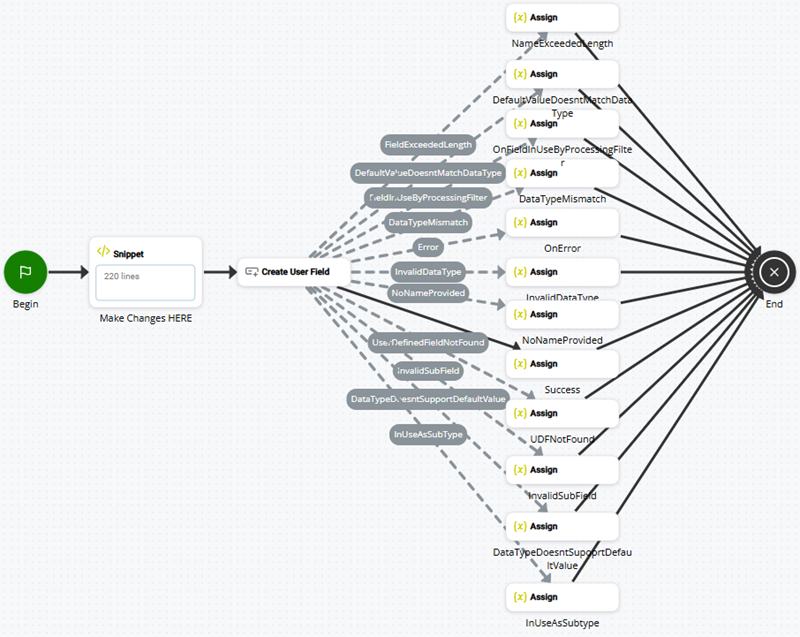
Dê um duplo clique na ação Snippet no script de exemplo para visualizar o código do snippet usado no exemplo. Você também pode visualizar o código do snippet em um arquivo TXT incluído no arquivo ZIP de exemplo abaixo