

Execution Logs
Content on this page is for a product or feature in a public preview program. If you are not part of the preview and would like more information, contact your account representative.
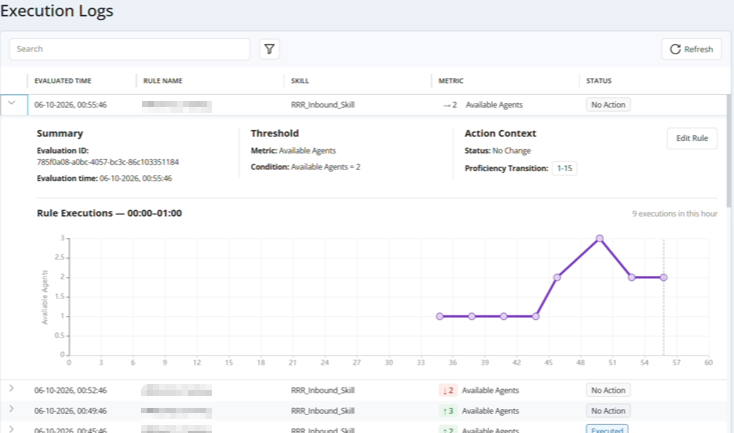
Execution logs show what happened each time a real-time routing rule evaluates the queue. They give you a centralized, searchable history of routing-related changes triggered by real-time routing rules. This tool helps you review system behavior, validate routing outcomes, and troubleshoot issues more efficiently by providing a clear audit trail of routing events.
Every time a real-time routing rule evaluates the queue for its assigned metric and ACD skill, the system records it in an execution log. You can see the full history of a rule this way, including times when the rule did nothing. All evaluations end with one of three possible results:
- No change: The metric value is still within the same guardrail as the last evaluation. The rule leaves the proficiency range as it is.
- Executed: The metric value moved into a different guardrail range. The rule updates the proficiency range of the contacts in the queue for the specified skill.
- Failed: The rule could not complete the evaluation.
Most rules for a healthy rule show now change. A rule changes routing only when the metric crosses into a different guardrail range.
You can access the logs from the Execution Log page in the routing center. From there, you can search and filter to find the events you want to review. Some rules show more logged events that others. This is because rules evaluate with different frequency depending on the media type A medium, such as voice, email, and chat, through which a contact connects with an intended recipient. of their assigned ACD skill Used to automate delivery of interactions based on agent skills, abilities, and knowledge..
After you find the log you want, you can:
- Expand the log entry to view additional details including evaluation data, trigger context, and the specific actions or results of the event.
- Open the relevant real-time routing rule directly from the log entry. There, you can investigate further and make changes to the rule if needed.
Execution logs only record routing changes made by real-time routing rules created in the routing center. It does not record routing changes made by Studio scripts.
Data in Execution Logs
Execution logs provide detailed information about each time a real-time routing rule evaluates the queue for its assigned ACD skill Used to automate delivery of interactions based on agent skills, abilities, and knowledge.. You can see when the rule executed today, the metric it evaluates and the condition set for that metric, the status of the evaluation, and the action the rule took.
The following table describes the data available in execution logs:
| Field | Details |
|---|---|
| Evaluation ID | The unique identifier assigned to the rule evaluation. |
| Evaluation time | The date and time at which the rule evaluation took place. |
| Rule Name | The name given to the rule by the NiCE CXone administrator who created it. |
| Skill | The ACD skill that the rule evaluates. |
| Threshold | The metric guardrail threshold that the rule evaluation crossed. |
| Metric | The metric that the rule uses. This is defined by the Type selected when you created the rule. |
| Condition | The value of the rule's metric when the rule evaluated the queue. This condition indicates which guardrail range the rule the evaluation matched. |
| Action Context | The change that the rule made, if any. |
| Status |
The event that occurred during the evaluation:
|
| Proficiency Transition |
The proficiency range that the rule assigned to contacts in the queue at the time the rule ran. If the status is No Change, this is the same proficiency range as the last evaluation. Contacts that already had the listed proficiency range when the rule runs are not modified. |
| Rule Executions |
A graph depicting each time this rule evaluated the queue within the listed time frame. Hover your cursor over each point to see the metric's value for each evaluation. The frequency of evaluations is determined by the media type |