

Permissions determine what a NiCE CXone employee account can do in the platform. They provide access to applications, options in applications, data, and so on.
You assign permissions to roles to define what that role can do. Then you assign roles to employee accounts according to what each individual needs access to. You can also assign roles to multiple employees at the same time with the bulk upload template for employees.
 View image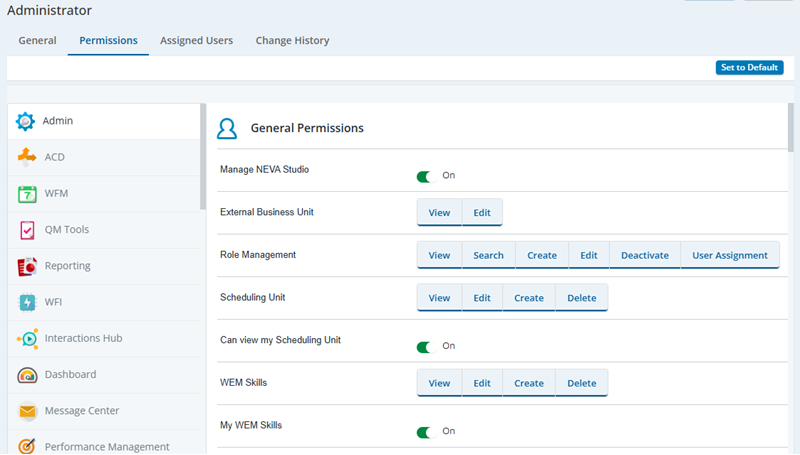
The available permissions are on the Permissions tab in the properties of each role. On that tab, permissions are organized by application. NiCE CXone shows only the applications you have licensed and enabled in your system.
Each permission has one or more parameters. The parameters define the specific actions that users are allowed to take when assigned the permission. For example, as shown in the preceding image, the Role Management permission has parameters for viewing the role management page in NiCE CXone, searching the roles on that page, creating new roles, editing existing roles, deactivating roles, and assigning users to a role.
There are reference pages in the online help for each application's permissions. See the list in the menu on the right side of the page.
Key Facts About Permissions
- When you create a new role, there are no default permissions associated with that role. To save time, you can copy an existing role and use it as the basis for a new role.
- Some permissions are dependent on others, and these dependencies may be reflected in the user interface when you click a permission to select it. For example, if you click an Edit permission, both Edit and View may show as selected since you must be able to view something in order to edit it. Permission dependencies may vary from one NiCE CXoneapplication to another.
- Details about the specific permissions and privileges you can include in roles are included in the permissions topic for each NiCE CXone application.
- Digital Experience (DX) permissions are managed in two places:
- Digital Experience (DX) roles: In the ACD application under Digital > Roles.
- NiCE CXone roles: In the Admin application under Roles and Permission in the ACD category.
- The following types of data are not limited by a role's permissions:
- Data download reports
- Direct data access reports
- APIs