

Required permission: Integrated Softphone On
Agent Workspace for Salesforce Voice (Agent for Service Cloud Voice) Integrated Softphone allows you to handle phone calls using your browser's voice capabilities and the voice control panel in Agent Workspace for Salesforce Voice (Agent for Service Cloud Voice). After your administrator enables your account to use Integrated Softphone, you can log in to Agent Workspace for Salesforce Voice (Agent for Service Cloud Voice), connect your softphone voice path to the NiCE CXone platform, and then handle calls using the voice workspace. You must enable the use of the microphone and speaker for the softphone extension. If you cannot see the dial pad or log out option in Agent Workspace for Salesforce Voice (Agent for Service Cloud Voice), you must perform an action in the agent application to see those options.
If the NiCE CXone WebRTC Softphone Extension is not installed on your browser, you will be prompted to install it for an enhanced call experience.
 View image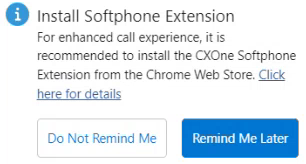
Designed for console application use only. If Agent Workspace for Salesforce Voice (Agent for Service Cloud Voice) is refreshed or a new tab is opened during a call, call connectivity will be lost for a few seconds before being re-established.