
Esta página de ajuda é para Desktop Studio. Estas informações também estão disponíveis para Studio.
|
|
Cria uma legenda ou mapa usado para interpretar estruturas de dados entre o sistema NiCE CXone e seu CRM |

Dependências
Create Source Map é destinado ao uso apenas com Proactive XS.
Tipos de script suportados
|
|
| Telefone |

Propriedades de entrada
Estas propriedades definem dados que a ação usa durante a execução.
|
Propriedade |
Descrição |
|---|---|
| Legenda |
Insira uma frase curta que identifique exclusivamente esta ação no script. A legenda aparece na tela do script no ícone da ação. |
| SourceName | The name of the source where the records originated. Provides a logical grouping of records within the system. If you have an invalid or missing source map, you may receive a Missing External ID error. |
| Mapeamento | The dynamic data structure that enables the NiCE CXone system to interpret the data from your system (CRM). |
Condições de Ramificação de resultado
As condições de ramificação de resultado permitem que você crie ramificações no seu script para tratar diferentes resultados quando uma ação é executada.
|
Condição |
Descrição |
|---|---|
| Padrão | Path taken unless the script meets a condition that requires it to take one of the other branches. It is also taken if the action's other branches are not defined. |
| InvalidSource | Path taken if the source name provided does not exist. |
| InvalidRootNode | Path taken if NiCE CXone cannot determine the presence of a system field or a custom definition for that field name. |
| InvalidFieldName | Path taken if NiCE CXone cannot determine the presence of a system field or a custom definition for that field name. |
| MissingRequiredField | Path taken if a required field necessary to process the contact is not found. Required fields include a phone number field and ExternalID. |
| Erro | Path taken when the action fails to execute properly. For example, when there is an unexpected problem such as poor connectivity, syntax errors, and so on. The _ERR variable, with a single underscore character, should be populated with a condensed explanation of the problem. |
| FieldsInUseCantApply | Path taken if there is an attempt made to change or remove a value currently in use by a filter. |
| NoChangesMade | Path taken if the mapping between NiCE CXone and your system match exactly. |
| ExceededMaxDestinations | Path taken if the number of phone numbers per contact exceeds the designated amount. For example, if the system allows for six numbers per contact and you provide seven, the system would follow this branch. |
Mapeamento de Campos
Em conjunto com a ação Create Source Map, você deve incluir uma ação  sistemas de Terceiros que gerenciam itens como contatos, informações de vendas, detalhes de suporte e históricos de casos.. Os seguintes são campos do sistema para o qual você pode mapear.
- Endereço
- Agente
- CallerID
- CallRequestStaleMinutes
- Cidade
- Conformidade
- ConfirmationRequired
- CustomerField1
- CustomerField2
- ExternalID
- Primeiro nome
- Sobrenome
- Notas
- Número de telefone
- PreferredCallTime
- Prioridade
- Pontuação
- Estado
- Fuso horário
- Cep
Você também pode mapear para a Definição de Dados personalizados que você criou em NiCE CXone.
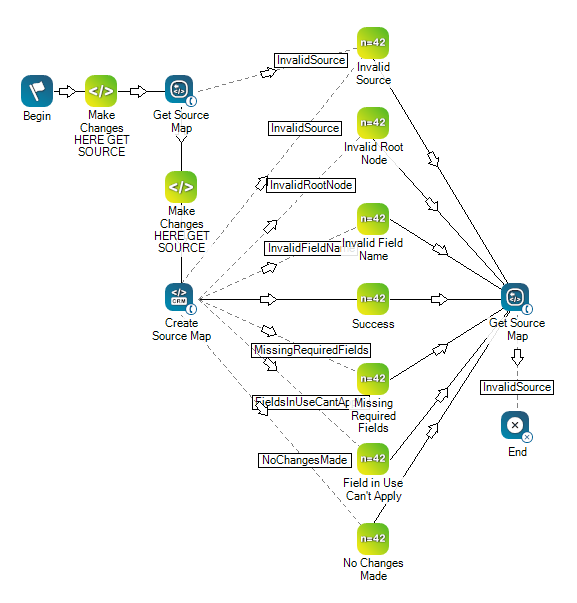
Este é um exemplo para mostrar como essa ação pode ser usada em Scripts. Ele não é voltado para um script inteiro. Pode ser necessário um script adicional.
O script mostrado abaixo pode ser usado para recuperar um mapa de origem (usando Get Source Map) ou para criar um novo mapa de origem (usando Create Source Map). Observe todos os mapeamentos originados do Create Source Map, que permitem que os registros provenientes do CRM sejam discados.
Este script contém duas ações
O snippet Make Changes Here GET SOURCE contém a seguinte linha de código
ASSIGN sourceName = "Nick Desk" O snippet Make Changes Here CREATE SOURCE contém a seguinte linha de código:
DYNAMIC testData
// CHANGE BELOW VALUE DEPENDING ON TEST
ASSIGN switchValue = "No Changes Made"

SWITCH switchValue
	{
		CASE "Invalid Source"
			{
			sourceName = "I Don't Exist"
			}
		CASE "Invalid Root Node"
			{
			testData.Fail.Phone = ""
			}
		CASE "Invalid Field Name"
			{
			testData = initialResult
			testData.Mappings.MyCustomField = ""
			}
		CASE "Missing Required Fields"
			{
			testData.Mappings.City = "City"
			testData.Mappings.State = "State"
			}
		CASE "Field In Use Cant Apply"
			{
			// Switch ValueString with a CDD or SDD that you currently have applied to a source and using to filter
			testData = initialResult
			testData.Mappings.FilterOnMe = "City"
			}
		CASE "No Changes Made"
			{
			// Don't Change anything just pass in the exact same mapping we've already got
			testData = initialResult
			}
		CASE "Create Mapping System"
			{
			// SYSTEM DATA DEFINITIONS
			testData = initialResult
			testData.Mappings.TimeZone = "Time Zone"
			testData.Mappings.Compliance = "Is Cell Phone"
			testData.Mappings.ConfirmationRequired = "Confirmation Required"
			testData.Mappings.CallerID = "Caller ID"
			testData.Mappings.Score = "Score"
			testData.Mappings.CustomerField1 = "Customer Field 1"
			testData.Mappings.CustomerField2 = "Customer Field 2"
			testData.Mappings.ExternalID = "External ID"
			testData.Mappings.Priority = "Priority"
			testData.Mappings.Zip = "Zip"
			testData.Mappings.State = "State"
			testData.Mappings.City = "City"
			testData.Mappings.Address = "Address"
			testData.Mappings.LastName = "Last Name"
			testData.Mappings.FirstName = "First Name"
			testData.Mappings.PhoneNumber = "Phone Number"
			}
		CASE "Update Mapping System"
			{
			// SYSTEM DATA DEFINITIONS
			testData = initialResult
			testData.Mappings.TimeZone = "My TimeZone"
			testData.Mappings.ConfirmationRequired = "Requires Confirmation"
			testData.Mappings.CallerID = "Phone Number"
			testData.Mappings.State = "Contacts State"
			}
		CASE "Create Mapping Custom"
			{
			// CUSTOM DATA DEFINITIONS
			testData = initialResult
			testData.Mappings.YourCDDName = "[COLUMN TO MAP IT TO]"
			}
		CASE "Update Mapping Custom"
			{
			// CUSTOM DATA DEFINITIONS
			testData = initialResult
			testData.Mappings.YourCDDName = "[COLUMN TO MAP IT TO]"
			}
		}